Programs

AutoSizer Automatically Resizes

AutoSizer Automatically Resizes

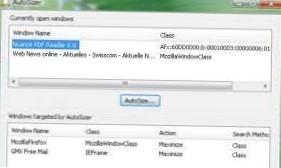
AutoSizer automatically resizes programs for you, keeping them at a specific size or keeping them maximized. One popular use is to keep Internet Explorer maximized when you go on the web. It works with most software programs, and supports maximizing to specific monitors on multi-monitor computers.
How To Disable Windows Search Feature In Windows 7
Hit Start, type “services,” and then click the result. On the right-hand side of the “Services” window, find the “Windows Search” entry and double-cli...
How To Use CCleaner To Clean Context Menu
Step 1 Open CCleaner and click on the blue toolbox on the left-hand side labeled Tools, then click on the button labeled Startup. Step 2 Next, click t...
How To Use Windows Defender To Scan Files And Drives In Windows 8
From the Start screen type defender and click the Windows Defender icon under the search results. Now select the Settings tab, Advanced and check Scan...